Speech ElevenLabs
Speech ElevenLabs is the WinnerWare speech provider for teams that want a more customized spoken voice experience, and fast speech-to-text, through ElevenLabs.
Overview
This module connects WinnerWare to ElevenLabs in two ways:
| Part | Purpose |
|---|---|
| Eleven Labs settings page | Chooses the voices used in guided WinnerWare experiences (Pro-tip Voice and Coach Voice). |
| ElevenLabs AI provider | Lets you create AI connections and deployments that use ElevenLabs for text-to-speech, speech-to-text, and realtime speech-to-text. |
ElevenLabs turns text into speech and speech into text. It does not write answers, so it cannot be the chat model of an assistant.
Key Features
- Adds an Eleven Labs settings page in WinnerWare.
- Lets teams choose separate Pro-tip Voice and Coach Voice options, and preview voice samples before saving.
- Adds ElevenLabs as an AI provider for connections and deployments.
- Provides text-to-speech with the voices in your ElevenLabs account.
- Provides speech-to-text for recorded audio.
- Provides realtime speech-to-text: it transcribes a person's speech live while they talk.
- Lists the voices in your ElevenLabs account, including the voices used by your ElevenLabs agents.
How It Works
Choose spoken voices for coaching and guidance
WinnerWare adds an Eleven Labs settings page under Settings so teams can choose the spoken voices used for speech-enabled guidance.
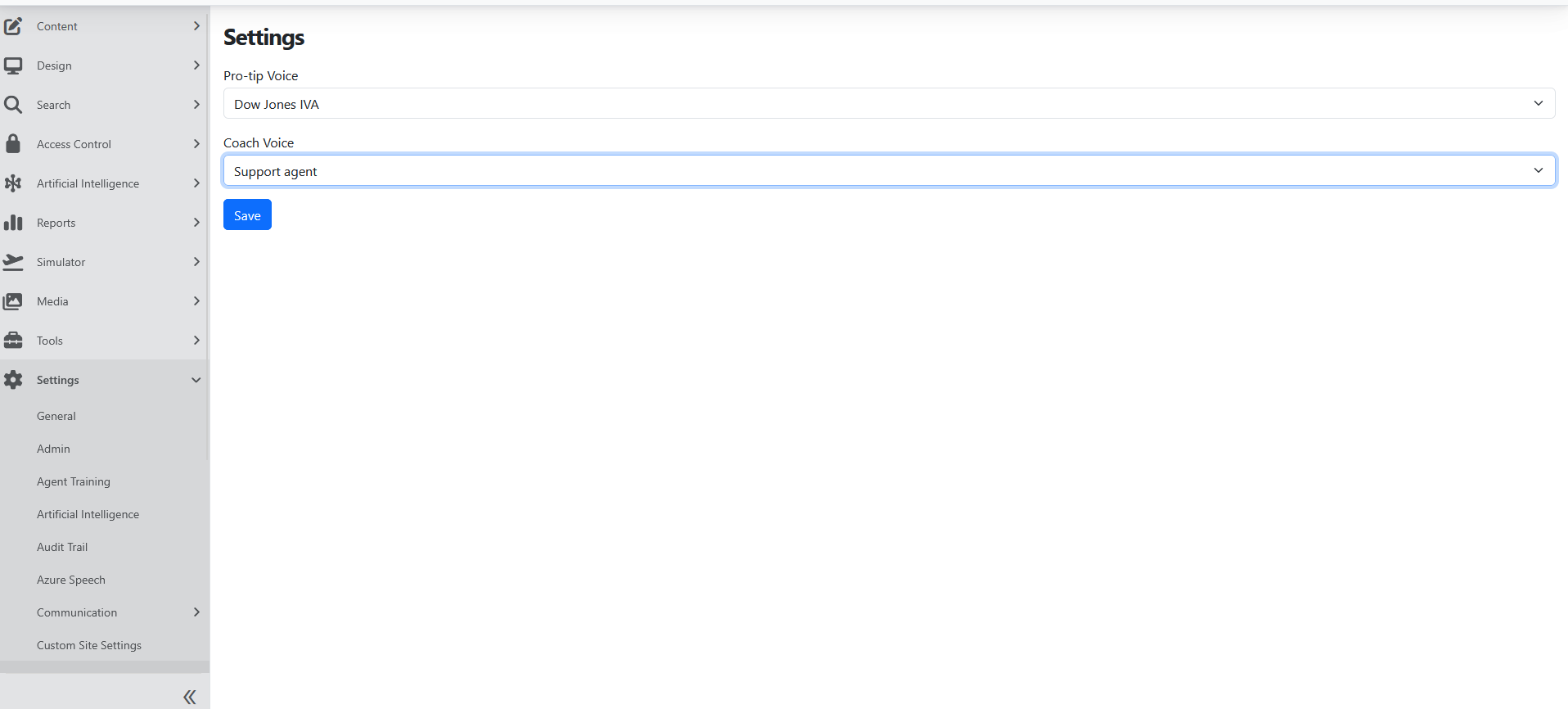
The page includes:
- Pro-tip Voice
- Coach Voice
Click Play sound sample next to a voice to hear it before you save.
Use ElevenLabs as an AI provider
The module registers ElevenLabs as a provider for AI connections and deployments. A deployment that uses ElevenLabs can serve one of these jobs:
| Job | What it does |
|---|---|
| Text-to-speech | Reads text aloud with an ElevenLabs voice. |
| Speech-to-text | Turns recorded audio into text. |
| Realtime speech-to-text | Transcribes live microphone audio while the person talks. |
The deployment's Model name selects the ElevenLabs model. The format of that value depends on the job:
| Job | Model name format | Example |
|---|---|---|
| Text-to-speech | The ElevenLabs model ID. WinnerWare sends it to ElevenLabs unchanged. | eleven_flash_v2_5 |
| Speech-to-text (recorded audio) | A WinnerWare model name, not the ElevenLabs ID: ScribeV1 or ScribeV2. Upper and lower case do not matter, but there is no underscore. A value such as scribe_v1 is rejected with the error "The specified ElevenLabs Speech to Text model ID ... is not valid." | ScribeV1 |
| Realtime speech-to-text | The ElevenLabs realtime model ID. WinnerWare sends it to ElevenLabs unchanged. | scribe_v2_realtime |
Always fill in Model name. See AI Realtime Voice for model recommendations, and AI Deployments for how to create a deployment and mark its Model capabilities.
Text-to-speech
ElevenLabs text-to-speech reads text aloud with a voice from your ElevenLabs account.
- Voice. The request uses the voice that the feature chooses, for example the Voice on an AI Profile. When no voice is chosen, WinnerWare uses the default voice ID from the site configuration. When there is no default voice either, the request fails with "No ElevenLabs voice was configured for the selected text-to-speech request."
- Streaming. When a feature asks for streamed audio, WinnerWare passes the audio on in small pieces as ElevenLabs produces it, so playback can start before the whole sentence is ready. Empty pieces of text, such as a single line break, are skipped instead of ending the session.
- Audio format. WinnerWare returns Opus audio unless the feature asks for another format, for example the raw audio that a realtime voice session needs.
Realtime speech-to-text
Realtime speech-to-text opens a live connection to ElevenLabs and returns the text as the person speaks. It returns partial text while the person talks and final text when each turn ends.
- Transcription only. ElevenLabs realtime turns speech into text. It does not reply. If a feature asks an ElevenLabs deployment for a spoken conversation, WinnerWare refuses the session with a clear error instead of opening a connection that never answers.
- Use it as the listening step of a voice assistant. A voice assistant can chain three deployments: speech-to-text, a chat model, and text-to-speech. ElevenLabs can provide the listening and speaking steps. To use ElevenLabs as the listening and speaking steps of a voice assistant, see AI Realtime Voice.
- Turn detection. By default, ElevenLabs detects when the speaker stops (voice activity detection) and closes the turn. When a feature turns voice activity detection off, the feature decides where each turn ends.
- Audio formats. Realtime speech-to-text accepts PCM audio at 8000, 16000 (the default), 22050, 24000, 44100, or 48000 Hz, or μ-law audio at 8000 Hz. Other formats are refused when the session opens, because audio at the wrong rate would produce wrong text.
- Model. The deployment's Model name selects the realtime transcription model. When it is empty, WinnerWare falls back to other configured model values, which are usually not realtime models, so always enter a realtime model ID.
- Voices. When a realtime voice picker asks an ElevenLabs deployment for voices, WinnerWare returns the voices in your ElevenLabs account.
Configuration
Enable the ElevenLabs provider
Turn on Speech Services (Eleven Labs) in Configuration -> Features for the tenant.
Choose the guidance voices
- Go to Settings -> Eleven Labs.
- Choose the Pro-tip Voice.
- Choose the Coach Voice.
- Click Play sound sample to preview a voice if needed.
- Save the settings.
Connect to ElevenLabs
- Ask your hosting team to add the ElevenLabs API key to the site configuration, in the
CloudSolutions_ElevenLabs_Speechsection. The ElevenLabs deployment editor has no API key box. - Go to Artificial Intelligence -> Deployments, select Add Deployment, and choose ElevenLabs in Available Providers.
- Enter the Model name in the format for the job (see Use ElevenLabs as an AI provider).
- On the Model capabilities card, check the capability for the job, and clear Text conversation, Tool calling, and Streaming, because ElevenLabs cannot chat.
- Select Save.
The configuration section can hold these values:
{
  "CloudSolutions_ElevenLabs_Speech": {
    "ApiKey": "<your ElevenLabs API key>",
    "DefaultVoiceId": "<optional default voice ID>",
    "TextToSpeechModelId": "<optional fallback text-to-speech model ID>",
    "SpeechToTextModelId": "<optional fallback speech-to-text model name, for example ScribeV1>"
  }
}
| Value | Purpose |
|---|---|
ApiKey | Your ElevenLabs API key. Required. |
DefaultVoiceId | The voice used for text-to-speech when no voice is chosen. |
TextToSpeechModelId | The text-to-speech model used when a deployment has no Model name. |
SpeechToTextModelId | The speech-to-text model used when a deployment has no Model name. For recorded audio, use the ScribeV1 or ScribeV2 format. |
Keep the API key in a secure configuration store, not in a file that is checked into source control.
Usage
Use separate voices for different types of guidance
The split between Pro-tip Voice and Coach Voice works well when the product should clearly separate lightweight guidance from stronger coaching or feedback moments.
Use ElevenLabs when voice quality is part of the experience
Choose this module when the spoken experience should feel more polished or more tailored to the product voice. This is especially useful in guided experiences where users hear frequent spoken prompts.
Add live transcription to a voice experience
Create an ElevenLabs deployment for realtime speech-to-text, and pair it with a chat deployment and a text-to-speech deployment in a Cascaded Realtime deployment. To use ElevenLabs as the listening and speaking steps of a voice assistant, see AI Realtime Voice.
Operational Notes
- The module adds a dedicated Manage Eleven Labs Settings permission for controlling who can edit the Eleven Labs settings page.
- The list of voices is cached for 15 minutes, so a voice you just added in ElevenLabs can take up to 15 minutes to appear.
- ElevenLabs does not provide chat, embeddings, or image generation. Use another provider for those deployments.
- ElevenLabs can end a realtime session because of its own limits, for example quota or session length. WinnerWare reports the ElevenLabs error when the session ends.
- This module does not transcribe Speech Insights call recordings. Those use Speech Azure.