Speech Azure
Speech Azure is the WinnerWare speech provider for teams that want Azure to handle speech playback, transcription processing, and cloud-based recording storage.
Overview
This module is used when a tenant wants Azure to power its speech experience. It supports both spoken guidance and transcription-heavy scenarios, while also giving teams a path to store shared recordings in cloud storage.
Key Features
- Adds an Azure Speech settings page in WinnerWare.
- Lets teams choose separate Pro-tip Voice and Coach Voice options.
- Supports Azure-driven speech transcription processing.
- Supports Azure-backed shared recording storage when that option is enabled.
- Supports the host-side processing option used when the default tenant handles incoming transcription callbacks.
How It Works
Manage voice choices from one settings page
WinnerWare adds an Azure Speech settings page under Settings so teams can manage the spoken voice used for guided experiences.
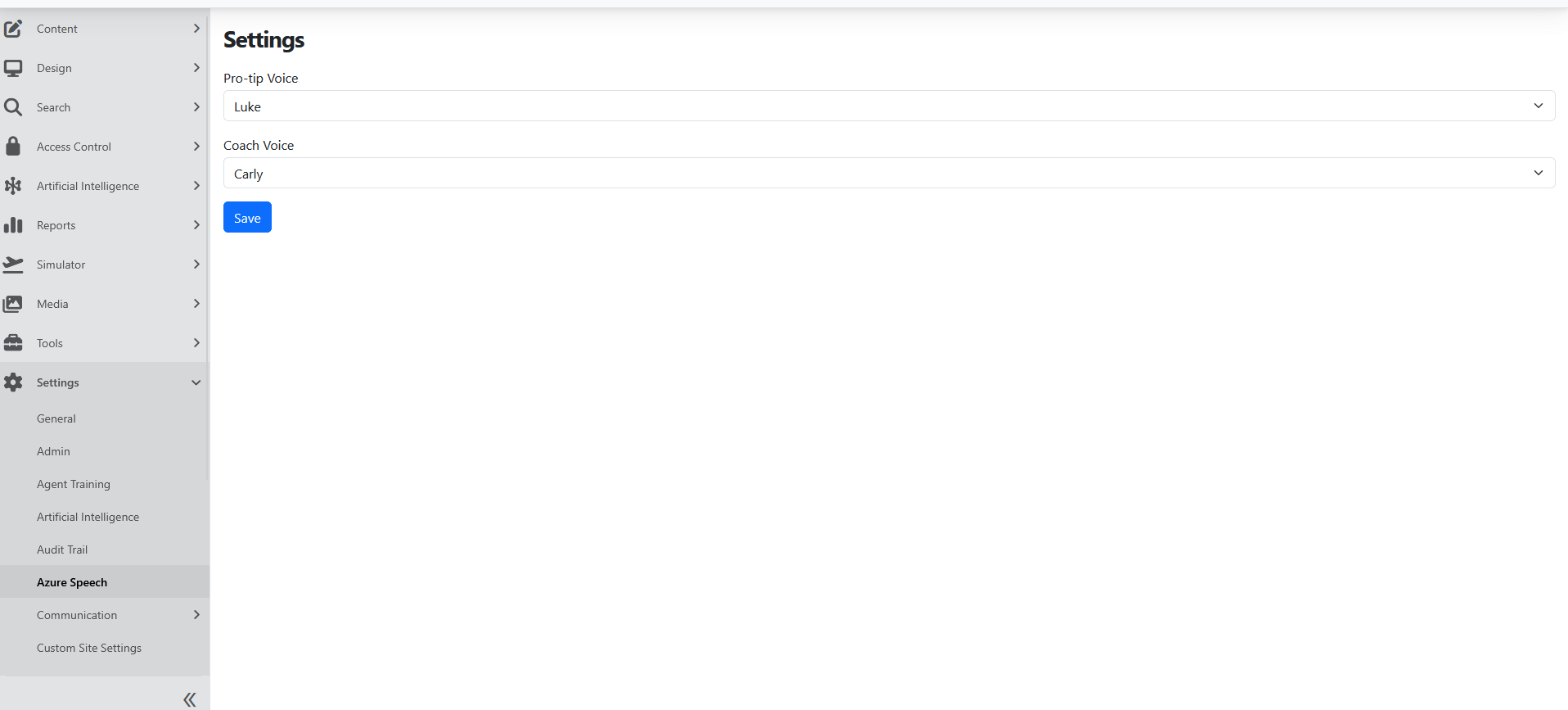
The page includes:
- Pro-tip Voice
- Coach Voice
This helps teams separate the voice used for guidance from the voice used for coaching or feedback.
Use Azure when transcription is part of the rollout
This module is also the right fit when teams want Azure to handle transcript processing for recordings. That makes it useful in speech-enabled journeys where recordings need to become transcript records for later use.
How Speech Insights recordings are transcribed
For Speech Insights, this module runs the transcription pipeline for each ingested recording:
- The audio is uploaded to shared storage and submitted to Azure AI Speech as a batch transcription job.
- When Azure finishes, WinnerWare downloads the recognized phrases and identifies the Agent and Customer speakers.
- Speech Insights redacts sensitive data, creates phrase embeddings, and applies transcript tags and indicators.
- WinnerWare creates the redacted audio file that reviewers hear.
- The Completed Speech Transcript workflow event is triggered.
- The Azure transcription job and the shared copy of the original recording are deleted.
A call is marked complete only when every stage succeeds. If a stage fails, the call is retried from that stage after 1, 5, 15, 30, and 60 minutes, up to 6 attempts, and then shows as Abandoned in Speech Insights -> Processing Queue. WinnerWare also checks Azure every hour for finished jobs whose completion notice was missed.
Transcribe calls in more than one language
Each Speech Insights ingestion source has a Locale and optional Candidate locales. When a source has two or more candidate locales (at most 10), Azure identifies the spoken language continuously, so the language can change during the call. Each phrase stores the language that Azure detected for it. With fewer than two candidate locales, the whole call is transcribed in the source Locale.
Add cloud storage when recordings must be retained
If the rollout needs shared recordings stored outside the local tenant file system, this module also supports the Azure storage path for those shared recording files.
Configuration
Enable the right Azure speech feature
Use the main Azure speech feature when Azure should be the active speech provider for the tenant.
Enable the related Azure transcription storage option when shared recordings should be stored in Azure.
Use the Azure host option when your environment relies on the default tenant to receive and process incoming speech-related callbacks.
Configure the settings page
After enabling the module:
- go to Settings -> Azure Speech
- choose the Pro-tip Voice
- choose the Coach Voice
- save the settings
These settings become the shared speech preferences for the tenant when Azure is the active provider.
Usage
Choose Azure for guided voice experiences
Use this module when your team wants Azure to drive the spoken voice for guidance and coaching. The split between Pro-tip Voice and Coach Voice works well when different kinds of spoken feedback should sound distinct.
Choose Azure for transcript-based experiences
Use this module when recorded speech needs to move into transcript handling and later follow-up work. This is especially useful when speech is part of training, review, or post-call processing.
This is also the feature Agent Trainer depends on for Content -> Import Interaction Story. If that page shows a warning that no interaction story import handler is registered, enable Speech Service (Azure) in Configuration -> Features for the tenant.
Operational Notes
- The Azure host option belongs in environments where the default tenant is responsible for receiving and handling incoming callback traffic.
- The module adds a dedicated Manage Azure Speech Settings permission for controlling who can edit the Azure speech settings page.
- Azure speech works best when it is treated as the tenant’s primary provider for both voice selection and transcription-related processing.