AI Agent Trainer
Agent Trainer is the WinnerWare training module for building repeatable coaching scenarios and letting agents practice them against an AI-played customer, by typing (Chat) or by speaking (Audio). Each practice session is checked step by step, saved as a transcript, and can be scored and summarized by AI so supervisors know where to coach.
Overview
From a business perspective, Agent Trainer helps teams standardize coaching scenarios, give agents a safe place to practice, measure performance, and review transcripts in a consistent format. Trainers build the scenarios, agents practice them, and managers review the results in transcripts and reports.
The module is split into three features:
| Feature | Purpose |
|---|---|
Agent Trainer (CloudSolutions.AgentTrainer) | Story authoring, the simulator, AI checking and scoring, transcripts, reports, settings, and story import. |
Agent Trainer Storage (CloudSolutions.AgentTrainer.Storage) | Saves the audio of each spoken reply in Audio sessions, lets managers play it back from the transcript, and deletes old recordings on a schedule. Adds the Retention Days setting. |
Agent Trainer Storage - Azure (CloudSolutions.AgentTrainer.Storage.Azure) | Keeps those recordings in Azure Blob Storage instead of the tenant's local file storage. |
Key Features
- Builds training scenarios as Interaction Story content items, organized by Interaction Story Category, with ordered steps.
- Lets each step answer with AI Generated Response or Predefined Responses, and check the agent's reply with Semantic Similarity to Assist, Classifications, or Semantic Assertion.
- Supports Chat and Audio practice from the admin area, from a front-end page, and from an Agent Simulator page that records the agent's name and email.
- Offers AI Assist, which shows the best-practice line, pro tips, and hints while the agent practices.
- Scores completed sessions against your own Score Criteria and shows the agent a Training Score with improvement tips at the end.
- Writes an AI summary of every completed session for the reports.
- Imports a draft story from a recorded call (
.opusor.wav). - Offers a Dry run so authors can test a story before agents use it.
- Gives managers transcript review, audio playback, six reports under Reports, a dashboard widget, and a workflow event when a session completes.
How It Works
Build training content
A trainer creates an Interaction Story for each scenario. The story holds the background the AI needs to play the customer (Story Context), the first line the agent sees (Opening Statement), and a list of Steps.
Each step describes one turn of the conversation:
- what the agent should say at this point (Model Prompt)
- how the customer answers once the agent gets it right (Action Type)
- how WinnerWare decides whether the agent's reply is good enough (Validation Strategy)
Optionally, the story also has Score Criteria that the AI uses to grade the whole session at the end.
What happens in a practice session
- The agent opens the simulator, picks a published story, picks Chat or Audio, and decides whether to tick AI Assist?.
- The simulator shows the Opening Statement. With AI Assist on, it also shows the first step's ProTip and an Assistance button that reveals the Model Prompt.
- The agent replies. In Audio mode, WinnerWare first turns the recording into text.
- WinnerWare checks the reply with the step's Validation Strategy. If the reply fails the check, the step does not move on. The agent sees the story's Default Interruption Phrase, or, with AI Assist on and after enough failed tries, a specific hint. The agent tries again.
- When the reply passes, the customer answers (from the AI or from the predefined messages) and the session moves to the next step.
- After the last step, WinnerWare saves the session, scores it (when the story has score criteria), writes a summary, and shows the agent a completion message with the Training Score.
Which AI jobs run and which deployment each one uses
Agent Trainer uses several separate AI jobs. Each one resolves its own AI deployment, so a missing deployment only breaks the job that needs it. For deployment concepts, see AI Deployments.
| Job | When it runs | Deployment used |
|---|---|---|
| Customer replies | Every step that uses AI Generated Response | Simulator Chat Deployment on the Agent Training settings page, or the tenant's Default chat deployment when set to Use default. |
| Checking agent replies | Every step, plus the grammar check when Validate Language in Chat Prompts is on | Simulator Utility Deployment on the Agent Training settings page, or, when set to Use default, the tenant's Default utility deployment (falling back to the chat deployment). |
| Scoring and session summary | Once, when a session completes | The tenant's Default utility deployment, or the Default chat deployment when no utility default is set. The Agent Training settings page does not change this. |
| Speech-to-text | Every spoken reply in an Audio session | The tenant's Default speech-to-text deployment. |
| Text-to-speech | Every customer, coach, and pro tip message in an Audio session | The tenant's Default text-to-speech deployment. |
| Story import | After an imported recording is transcribed | The Interaction Story Import Optimizer AI profile. It uses the default chat deployment unless you change the profile. |
The tenant defaults are set in Settings -> Artificial Intelligence, on the Default Deployments tab.
The simulator does not use Realtime voice. Audio mode is push-to-talk: the agent records a reply, WinnerWare transcribes it, checks it, and plays back the customer's answer. A deployment's Realtime capability has no effect on Agent Trainer.
Review results
Every completed session becomes a training transcript. Managers can read it message by message, see where the agent was interrupted and why, play back recordings (when storage is enabled), see the score, and run reports that compare agents, assisted and unassisted practice, and interruptions over a date range.
Configuration
Enable the right feature set
Go to Configuration -> Features and enable Agent Trainer. WinnerWare enables the features it depends on at the same time, including SignalR, Reports, Notifications, Speech, Speech Core Services, Speech Transcriptions, AI Chat, and the Azure OpenAI provider.
Enable the storage features only when your team needs to keep and play back audio recordings:
- Agent Trainer Storage for recording retention and playback
- Agent Trainer Storage - Azure when recordings should be stored in Azure Blob Storage
Optional features add more:
| Feature | What it adds to Agent Trainer |
|---|---|
| Speech Service (Azure) | The story import from a recording, and the Coach Voice / Pro-tip Voice settings. |
| Speech Transcriptions Store (Azure) | Required for story import. It stores the uploaded recording where Azure can read it. |
| Reports (OpenXml) | Excel (.xlsx) export for the Agent Training reports. CSV export is built in. |
| Admin Dashboard | The User Simulator Stats dashboard widget. |
| Workflows | The Completed simulator session workflow event. |
When Agent Trainer is enabled, WinnerWare also allows the browser microphone in the tenant's permissions policy (Security -> Settings -> Security Headers, Permissions Policy tab) if no microphone rule exists yet. This is what lets Audio sessions ask for the microphone.
Permissions
Assign these permissions to roles in Security -> Roles. The Administrator role has all of them. The Agent role gets Simulate user interaction by default.
| Permission | What it allows |
|---|---|
| Simulate user interaction | Open Simulator -> Simulate and the front-end /simulator page and practice stories. |
| Simulate agent interaction | Open the front-end /agent-simulator page, which asks for name and email before practice. |
| Dry run interaction story | See the Dry run story button and the Dry Run action on stories. Also allows simulation. |
| Manage training transcripts | Open Simulator -> Manage Transcriptions, read transcripts, and play recordings. |
| Manage agent training settings | Open Settings -> Agent Training. |
| Run Transcript Summary Report, Run Transcript Records Report, Run Agent Transcript Records Report, Run Transcript Records - Interruptions Report, Run Performance Summary Report | Run the matching report under Reports. |
Creating and editing stories, categories, and classifications uses the normal content permissions for those content types. Content -> Import Interaction Story needs permission to edit Interaction Story content.
Default AI deployments
Before agents practice, make sure Settings -> Artificial Intelligence (Default Deployments tab) has:
| Setting | Needed for |
|---|---|
| Default chat deployment | Customer replies (unless Simulator Chat Deployment is set), scoring and summaries when there is no utility default, and story import. |
| Default utility deployment | Checking replies (unless Simulator Utility Deployment is set), scoring, and session summaries. |
| Default speech-to-text deployment | Audio sessions. |
| Default text-to-speech deployment | Audio sessions and the Voice Name list on stories. |
Chat sessions only need the chat and utility deployments. Audio sessions need all four.
Agent Training settings
Go to Settings -> Agent Training. You need the Manage agent training settings permission.
| Setting | What it does |
|---|---|
| Title Template | A Liquid template that builds the title of each training transcript. You can use Model, User, Status, and StoryContentItem. Status is Chat or Voice. Leave it blank to use the default, which gives titles such as VPN support website access review - Chat: Jane Smith. WinnerWare rejects the value if it is not valid Liquid. |
| Simulator Chat Deployment | The deployment that plays the customer. The list shows deployments that can do chat work. Use default uses the tenant's Default chat deployment. |
| Simulator Utility Deployment | The deployment that checks agent replies (semantic similarity, classifications, assertions, grammar, and hints). The list shows deployments that can do utility work. Use default uses the tenant's Default utility deployment, or the chat deployment when no utility default is set. |
| Retention Days | Appears only when Agent Trainer Storage is enabled. The number of days to keep audio recordings before the cleanup task permanently deletes them. Default: 30. |
The two deployment settings are grouped under Default Deployments on this page. They do not affect scoring or session summaries (see the table in How It Works).
Voices for Audio sessions
Audio sessions speak with three kinds of voice:
- Customer voice — set per story with Voice Name. Choose Random, Random (Female), Random (Male), or a specific voice. The list shows voices from the Default text-to-speech deployment that match the site's languages. Random choices avoid the coach and pro tip voices when other voices exist.
- Coach Voice — reads the opening statement, the Assistance text, and interruption messages.
- Pro-tip Voice — reads pro tips.
Set Coach Voice and Pro-tip Voice on the speech provider's settings page: Settings -> Azure Speech (see Speech Azure) or Settings -> Eleven Labs (see Speech ElevenLabs).
Recording storage and retention
With Agent Trainer Storage enabled, WinnerWare saves the audio of each spoken agent reply in Audio sessions. Chat sessions have no recordings.
- Local storage (default): recordings are kept in the tenant's own application data folder (
AgentTrainingRecordings). - Azure storage: enable Agent Trainer Storage - Azure and have your hosting administrator add the
CloudSolutions_AgentTraining_AzureRecordingconfiguration section (withConnectionStringandContainerName). WinnerWare creates the container when the tenant starts. If that section is missing, WinnerWare keeps using local storage even though the feature is enabled.
The background task Agent Training Recording Trimming Job runs every day at 1:00 AM (server time). It permanently deletes recordings older than Retention Days, counted from the last recording in the session. The transcript text, scores, and reports stay; only the audio is removed. Setting Retention Days to 0 deletes all recordings at the next run.
Import prerequisites
The Import Interaction Story screen accepts one .opus or .wav file up to 10 MB. To import, the tenant needs:
- Speech Service (Azure) enabled. Without it, the page shows:
No interaction story import handler is registered. Enable a speech service feature to import stories. - Speech Transcriptions Store (Azure) enabled, so the recording is stored where Azure can transcribe it. Without it, the import fails with
An error occurred while starting the import process. Please try again later. - A working chat deployment for the Interaction Story Import Optimizer AI profile (under Artificial Intelligence -> Profiles). WinnerWare creates this profile for you and you cannot delete it.
The importer transcribes in US English (en-US) and expects a two-party call. If Antivirus is enabled, the upload is scanned first and can be rejected.
Usage
Create categories and classifications
Create these supporting items first from Content -> Content Items:
- Interaction Story Category — just a title. Use categories to group stories by topic, queue, or training program. The simulator groups its story list by each story's first category.
- Interaction Story Classification — only needed for steps that use the Classifications strategy. Each classification is one thing the agent's reply must contain, such as "confirms the caller's identity".
| Classification field | What it does |
|---|---|
| Title | The name of the classification. |
| Definition | Describes the classification. The AI uses it to decide whether a reply matches. |
| Hint | Required. The hint shown to the agent (with AI Assist) when the reply is missing this classification. |
| Reference | Optional link shown under Resources with the hint. |
| Media | Optional files shown under Resources with the hint, as downloads. |
| Alias | Give each classification an alias. WinnerWare ignores classifications without one when checking replies. |
The content list below shows how categories and stories are managed in the WinnerWare admin.
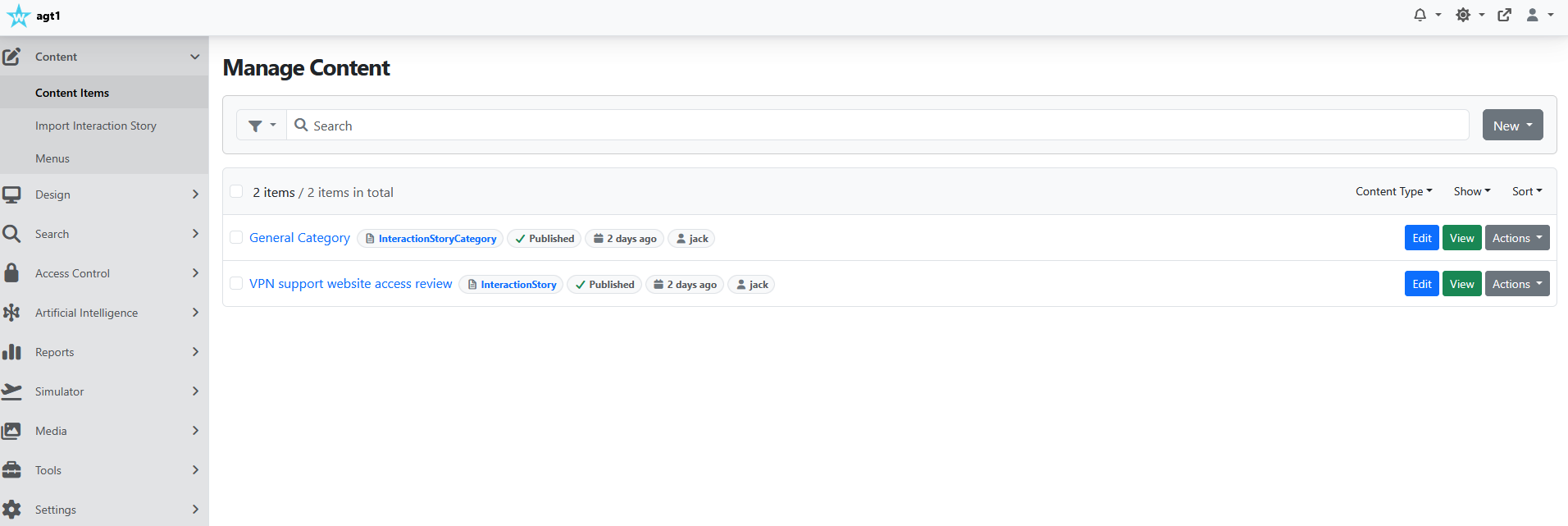
Create an interaction story
Create an Interaction Story from Content -> Content Items. Only published stories appear in the simulator.
| Field | What it does |
|---|---|
| Title | Required. The story name agents pick in the simulator and managers pick in reports. |
| Description | Internal description of the scenario. |
| Category | The Interaction Story Category the story belongs to. |
| Story Context | Background, personal details, and instructions for the AI playing the customer, such as who the caller is and what problem they have. |
| Opening Statement | The first message the agent sees. If blank, the simulator shows "Start by writing something". |
| Default Interruption Phrase | Required. What the agent sees or hears when a reply fails a check and no hint is shown. |
| Validate Language in Chat Prompts | On by default. In Chat sessions, checks each reply for grammar, punctuation, and typos, and rejects replies that fail. Not used in Audio sessions. |
| Voice Name | The customer voice for Audio sessions. See Voices for Audio sessions. |
| Steps | The ordered list of Interaction Story Step items. Drag steps to change the order. |
| Add scoring criteria | Turns on scoring for the story. See Add scoring. |
A simple example you could build is:
- Category: General Category
- Story: VPN support website access review
In this example, the Opening Statement starts the practice with a clear expectation: the call is a short VPN support review in 5 quick steps. The steps could be:
- Describe the VPN issue
- Have you restarted the VPN client
- Which website do you need
- What access message do you see
- What approval do you need
Each step captures one clear part of the conversation, which keeps it easy to check.
Build the steps
Each step has a Content tab and a Settings tab. WinnerWare names the step after its Model Prompt.
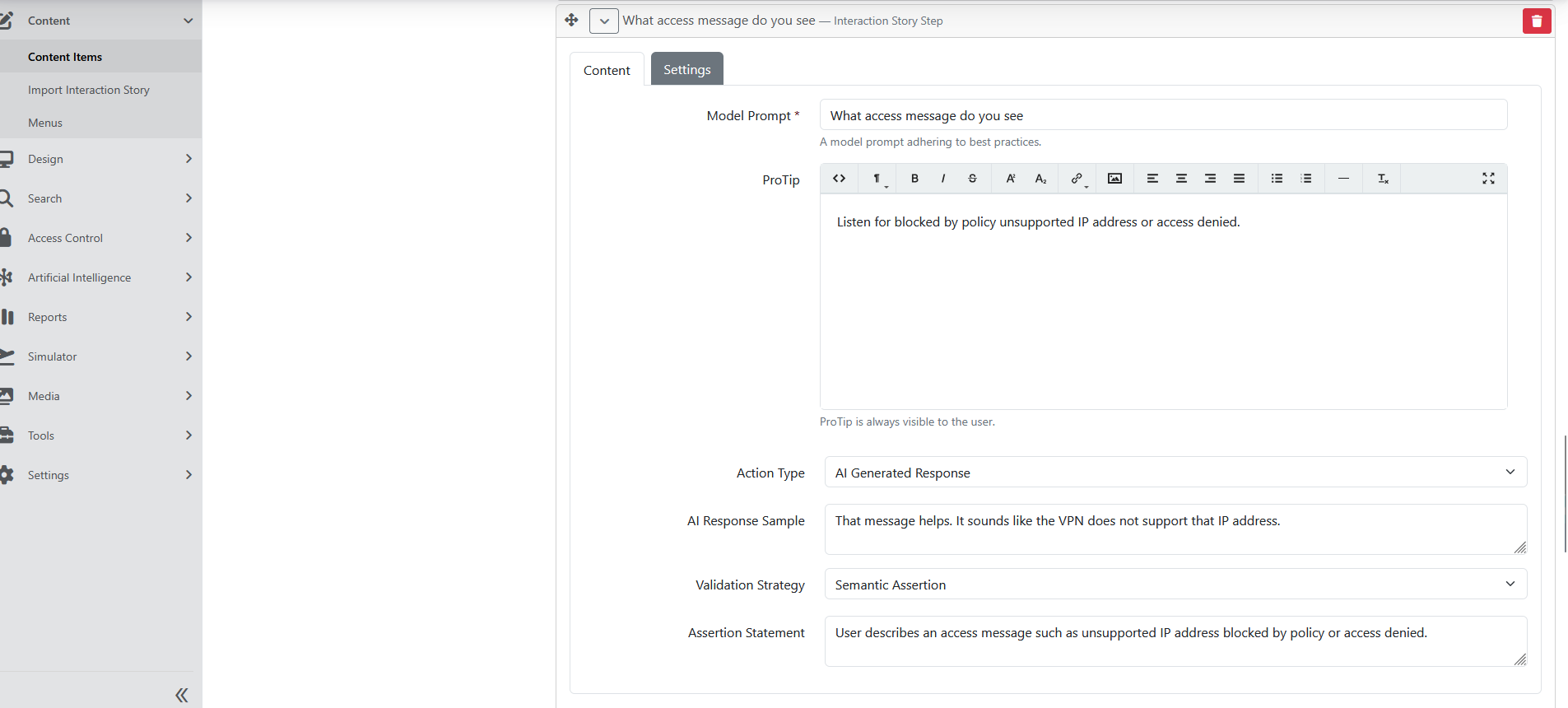
Content tab:
| Field | What it does |
|---|---|
| Model Prompt | Required. The best-practice line the agent should say at this step. AI Assist shows it behind the Assistance button, Semantic Similarity to Assist compares the agent's reply with it, and a Dry run sends it as the agent's reply. |
| ProTip | A coaching tip shown with the customer's message before this step, in AI Assist sessions only. The editor hint says the tip is always visible, but unassisted sessions do not show it. |
| Action Type | How the customer answers once the agent's reply passes. AI Generated Response or Predefined Responses. |
| AI Response Sample | Shown for AI Generated Response. An example of what the customer should say next. The AI writes a reply in that spirit, based on the conversation so far. Leave it blank to let the AI answer freely from the Story Context and conversation. |
| Predefined Messages | Shown for Predefined Responses. One or more exact customer messages, sent in order about three seconds apart. At least one is required. Use Add for more rows. |
| Validation Strategy | Required. How WinnerWare checks the agent's reply. See the next table. |
| Assertion Statement | Shown for Semantic Assertion. Required. The statement the reply must satisfy. |
| Interruption Language | Shown for Semantic Similarity to Assist. Required. The hint shown (with AI Assist) when the reply is not close enough. |
| Classifications | Shown for Classifications. The classifications the reply must contain. |
Validation Strategy options:
| Option | How the reply is checked | Hint shown with AI Assist |
|---|---|---|
| Semantic Similarity to Assist | The AI rates how close the reply is to the Model Prompt on a 0–10 scale. Below 8 fails. | Interruption Language (or the Model Prompt if blank). |
| Classifications | The AI checks which of the step's classifications the reply contains. A missing classification fails. | The Hint of each missing classification, plus its Reference and Media under Resources. |
| Semantic Assertion | The AI decides whether the reply satisfies the Assertion Statement. | A hint the AI writes for that reply. |
Settings tab:
| Field | What it does |
|---|---|
| Number of Interruptions Required for Hint to be Revealed | In AI Assist sessions, the hint appears only after the agent fails this step more than this many times. Before that, the agent sees the Default Interruption Phrase. Default: 2 (the hint appears on the third failed try). 0 or blank shows the hint on the first failure. |
| Token Length | Maximum length of the AI customer reply for this step. Default: 100. |
| Temperature | How varied the AI customer reply is, from 0 to 1. Higher is less predictable. Default: 0.4. |
Tips for good steps, using the VPN example:
- Put the ideal agent line in Model Prompt, such as "Have you restarted the VPN client?"
- Use ProTip for the coaching reminder, such as asking whether the VPN fails to connect or disconnects after sign-in.
- Use Predefined Responses when the customer's answer must be exact, and AI Generated Response when it can vary.
- Use Semantic Assertion when the reply must contain specific facts, such as naming the website or quoting the error message.
Add scoring
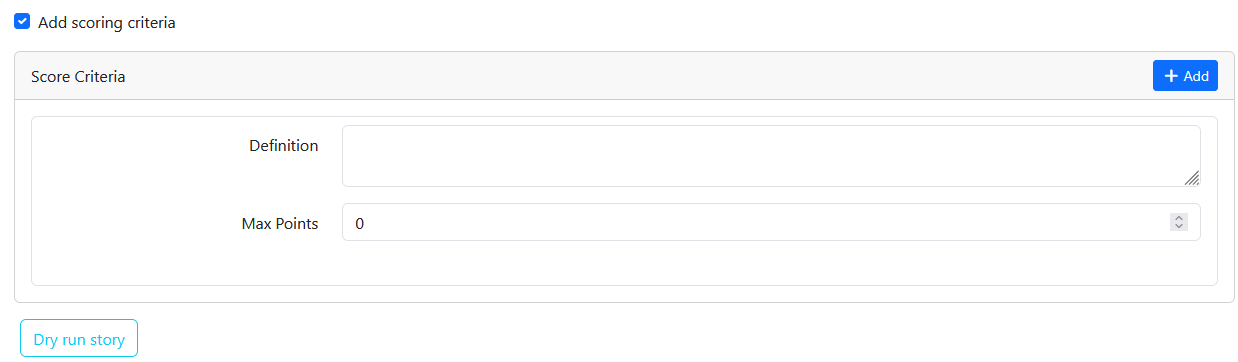
Scoring is set once per story, below the steps. Tick Add scoring criteria, then add one row per criterion under Score Criteria:
- Definition — what the agent is graded on, such as "Confirms the website name before escalating".
- Max Points — the most points this criterion can earn.
At least one criterion is required when the box is ticked. When a session completes, the AI reviews the whole conversation, including failed tries and assistance, and gives each criterion a score, an explanation, improvement tips, and positive feedback.
Test a story with a dry run
Save the story, then click Dry run story in the editor, or use Dry Run in the story's actions menu in the content list. You need the Dry run interaction story permission.
The dry run opens in a new tab and runs the story as an assisted Chat session, sending each step's Model Prompt as the agent's reply. It returns a technical result with a Result of Completed, Failed (a step could not be passed), or Incomplete (it took longer than 10 minutes), plus the full exchange. Dry runs are not shown in Manage Transcriptions, reports, or dashboard stats.
A failed dry run usually means a step's check is stricter than its own Model Prompt, which real agents will find frustrating too.
Import a story from a recording
Go to Content -> Import Interaction Story, enter a Title, choose the file, and click Upload.
- WinnerWare creates a draft story and sends the recording to Azure for transcription. The page shows that the import has started.
- When transcription completes, the Interaction Story Import Optimizer AI profile writes the Story Context and Opening Statement and cleans up the conversation.
- WinnerWare creates one step per agent turn: the agent's line becomes the Model Prompt, the customer's next line becomes the AI Response Sample, and the strategy is Semantic Similarity to Assist.
- The story owner gets a WinnerWare notification that the story was imported, or that the audio could not be transcribed.
Review the draft before you publish it. Fill in Default Interruption Phrase and each step's Interruption Language, because both are required when you save.
Run simulations
There are three ways in:
| Where | Path | Permission |
|---|---|---|
| Admin | Simulator -> Simulate | Simulate user interaction |
| Front end | /simulator | Simulate user interaction |
| Front end, with agent details | /agent-simulator | Simulate agent interaction |
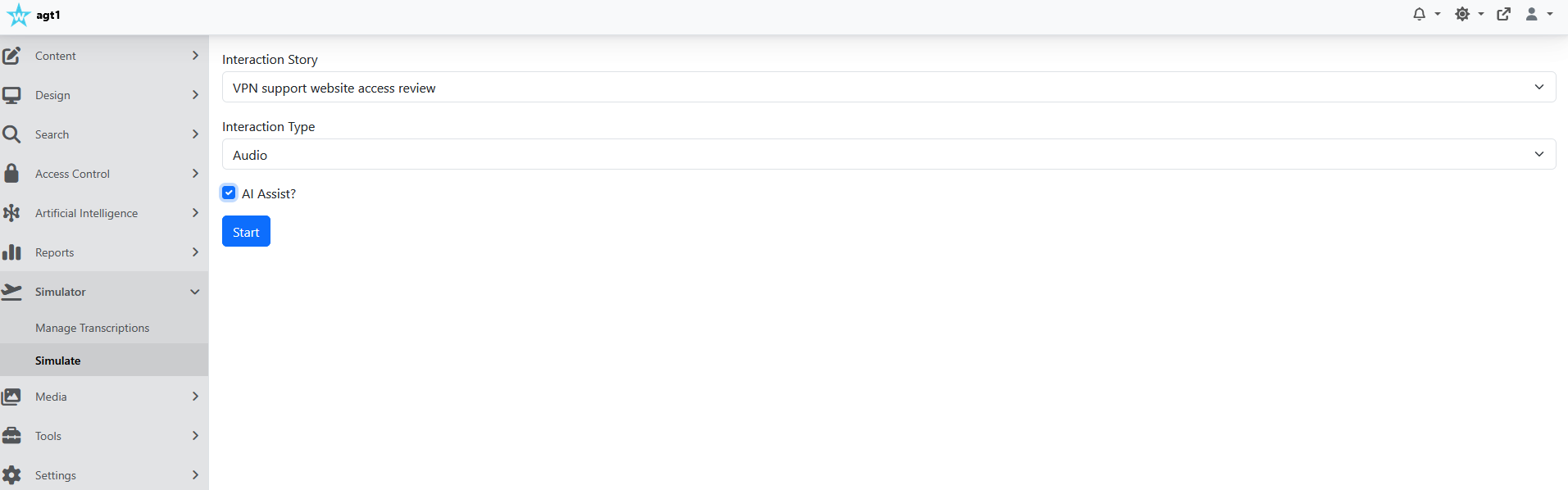
Each page asks for:
- Interaction Story — a published story, grouped by category.
- Interaction Type — Chat or Audio.
- AI Assist? — tick to show pro tips, the Assistance button, and specific hints.
The /agent-simulator page also asks for First Name, Last Name, and Email Address. These details are saved with the session and appear in the Agent transcript summary report. Click Start to begin.
What the agent sees
Chat sessions:
- The conversation fills the screen. The agent types in Type your message and clicks Send or presses Enter.
- Customer messages show the customer avatar. Pro tips appear in a blue box with a light bulb.
- With AI Assist, an Assistance button appears. Hovering over it shows the Model Prompt. WinnerWare records whether the agent looked at it.
- A failed reply gets a red warning badge. Hover over it to read the interruption message or hint, and any Resources links.
Audio sessions:
- The browser asks for microphone access. The agent must allow it.
- The agent clicks the red microphone button (tooltip Click to record) to start, and clicks it again (Click to stop speaking) to send the reply.
- WinnerWare shows the transcribed words in the conversation, then plays the customer's spoken reply. Each message has a play button to hear it again. The pro tip plays once automatically.
- If WinnerWare cannot understand the recording, it asks the agent to speak clearly and try again.
When the last step passes, the agent sees "You have successfully completed the session. Please wait while we save your progress." and then the final message. If the story has score criteria, a Training Score section shows Final score, Grade, Score explanation, Improvement tips, and Feedback.
Each start creates a new session. If the agent leaves the page, or the connection cannot recover, the unfinished session stays incomplete and does not appear in transcripts or reports.
Review transcripts and recordings
Go to Simulator -> Manage Transcriptions. Choose a From and To date and an Interaction Story, then click Show. The list shows completed sessions (dry runs excluded), newest first. Click View on a session to open it.
The transcript page shows:
- Summary — Status, Interaction Type (Chat or Voice), Assisted?, Total Unique Steps with at Least One Interruption, Completed At, and Total seconds.
- Training Score — when the story has score criteria: the overall result plus an Evaluation Criteria section with each criterion's score, explanation, tips, and feedback.
- The full conversation. Failed replies are highlighted, with the interruption message on the warning badge and any Resources. In Audio sessions with storage enabled, each agent reply has a play button for its recording, until the retention period deletes it.
Review reports
Agent Training reports are built on the CrestApps Reports framework (see Reporting). Open Reports and look in the Agent Training group. Each report has the built-in Date range filter and an Interaction story filter. Pick a story; a report without one is empty. Only completed, non-dry-run sessions are included, and the story's steps become columns.
| Report | What it shows |
|---|---|
| Transcript summary | Per agent: practices, total and average time, interruptions, assisted count, and average score when the story is scored. |
| Transcript records | One row per practice, with scoring, duration, interruptions, assistance, and the AI session summary. |
| Agent transcript summary | One row per practice started from /agent-simulator, with First Name, Last Name, Email, scoring, duration, interruptions, assistance, and the summary. Sessions started elsewhere are not listed. |
| Transcript records - interruptions | One row per practice, showing the failed replies captured for each step. |
| Assisted transcript summary | Assisted practices with per-agent subtotals and a grand total, flagging the steps where assistance was used. |
| Performance summary | Per agent, split into Assisted and Unassisted, with subtotals and a grand total. |
Use Export on a report to download it. CSV is built in; Excel (.xlsx) needs Reports (OpenXml).
Other ways to use the results
- Dashboard widget — with Admin Dashboard enabled, add the User Simulator Stats widget. It shows the signed-in user's sessions completed today, in an Assisted Summary and an Unassisted Summary: Simulations, Utterances, Interrupted Utterances, and Interruptions. Total Minutes to Cache controls how long the numbers are kept before they are recalculated.
- Workflows — with Workflows enabled, the Completed simulator session event (in the Agent Training category) starts a workflow each time a session completes. The workflow receives the transcript, the story's step headers, the user, and the agent details from
/agent-simulatorwhen present. Use it to send a completion email or notify a supervisor. See Workflows. - AI assistants — Agent Trainer adds two AI tools in the Agent Trainer Reports category: List interaction stories and Query transcript report. These tools are built in: they do not appear on the Capabilities tab, and any assistant whose deployment has Tool calling turned on can use them, so people can ask questions about training results in chat. See AI Capabilities and AI Prompting.
Operational Notes
- Use categories to keep story libraries organized by business topic, queue, or training program.
- Keep scoring criteria focused on behaviors that supervisors actually review in coaching sessions.
- Dry run every story after you change its steps. It is the fastest way to find a check that nobody can pass.
- Unfinished sessions and dry runs never reach transcripts, reports, or dashboard stats.
- Retention deletes recordings only. Plan retention around your governance rules for voice data; transcripts are kept until someone removes them.
- The Query transcript report tool returns all training data for a story. Publish AI assistants only to people who may see every agent's training results.
- The Assisted transcript summary report cannot be granted to other roles on the role editor today; administrators can run it.
Troubleshooting
| Problem | Likely cause | What to do |
|---|---|---|
| The story is missing from the simulator list. | The story is not published. | Publish the story. |
| The simulator stays on Loading.... | The browser cannot keep a live connection to WinnerWare. It retries every five seconds. | Check the network, proxy, or firewall. See SignalR. |
| The agent's message is sent but no reply ever comes, even on steps with Predefined Responses. | No chat deployment resolves. | Set Simulator Chat Deployment, or the Default chat deployment in Settings -> Artificial Intelligence. |
| The customer answers "AI is not configured." | No chat deployment resolves for the AI reply. | Same as above. |
| Every reply fails, or every chat reply is flagged for typos. | No utility deployment resolves, so the checks cannot pass. | Set Simulator Utility Deployment, or the Default utility deployment. |
| The session completes but shows no Training Score. | The story has no score criteria, or no default utility or chat deployment is set. | Tick Add scoring criteria and add criteria, and check the tenant defaults. |
| Audio start shows "No text-to-speech deployment is configured." | No Default text-to-speech deployment. | Set it in Settings -> Artificial Intelligence. |
| Recording works but shows "No speech-to-text deployment is configured." | No Default speech-to-text deployment. | Set it in Settings -> Artificial Intelligence. |
| A deployment you expect is not in the Simulator Chat Deployment or Simulator Utility Deployment list. | The deployment cannot fill the chat or utility role, for example because Text conversation is not checked on its Model capabilities card, or it is a Realtime deployment. | Check the deployment's capabilities. See Deployment roles. |
| "You must allow Microphone access to use this feature." | The agent blocked the microphone, or the tenant's permissions policy does not allow it. | Allow the microphone in the browser's site settings, and check Microphone on the Permissions Policy tab. |
| "mediaDevices is not supported by your browser." | The page is not on HTTPS, or the browser cannot record audio. | Use HTTPS and a current browser. |
| The microphone button does nothing. | Many browsers need an audio encoder that the page downloads from cdn.jsdelivr.net. | Allow that address through your network filter. |
| "We are unable to proceed with your recording..." | The recording was silent or unclear. | Speak clearly, closer to the microphone, and try again. |
| No play buttons on agent replies in a transcript. | The session was Chat, Agent Trainer Storage is off, or the retention period has passed. | Enable storage before practice; recordings are not created after the fact. |
| Import page warns that no import handler is registered. | Speech Service (Azure) is off. | Enable it in Configuration -> Features. |
| Import fails right after upload. | Speech Transcriptions Store (Azure) is off, or the file was rejected. | Enable the feature and check the file type and size. |
| The imported story has no steps or you get "Unable to transcribe the uploaded audio file." | The recording had too little speech, or speakers could not be told apart. | Use a clear two-party call recording. |