AI Chat
AI Chat is the WinnerWare module for turning your configured AI models and knowledge sources into reusable chat experiences. It gives teams a practical path for delivering either an all-in-one Chat Interactions experience or a repeatable assistant on the admin menu, a page widget, or an external site.
Overview
This module helps teams move from "we have an AI model" to "we have a working assistant people can actually use." It supports the full flow of choosing model deployments, grounding answers against a knowledge source, shaping the assistant behavior through profiles and templates, and then exposing that experience in WinnerWare.
The module ships with two main experiences:
| Experience | Purpose |
|---|---|
| AI Chat | Handles the reusable WinnerWare assistant, profile-based chat sessions, and page/widget integrations. |
| External Widgets | Exposes the same assistant experience to approved external applications and sites. |
Key Features
- Uses AI Profiles to create reusable chat assistants with a stable business purpose.
- Supports Chat Interactions as a separate all-in-one chat experience for teams that want to work without a profile-led flow.
- Connects chat responses to indexed business content so answers can stay grounded in approved information.
- Supports reusable prompt and setup patterns so teams can standardize assistants across different use cases.
- Adds an AI Chat Search Form widget that can be placed on a WinnerWare page.
- Supports external chat widgets for use outside the main application.
- Supports spoken Conversation next to typed messages, so people can type or talk to the assistant in the same chat, in the front-end chat and in external widgets.
- Stores session history and can generate a session title from the first prompt.
How It Works
Start with the shared AI settings
WinnerWare relies on the shared Settings -> Artificial Intelligence area for the default deployments used by Chat Interactions and AI Profiles. In the current tenant setup, the defaults include separate chat, utility, and embedding deployments.
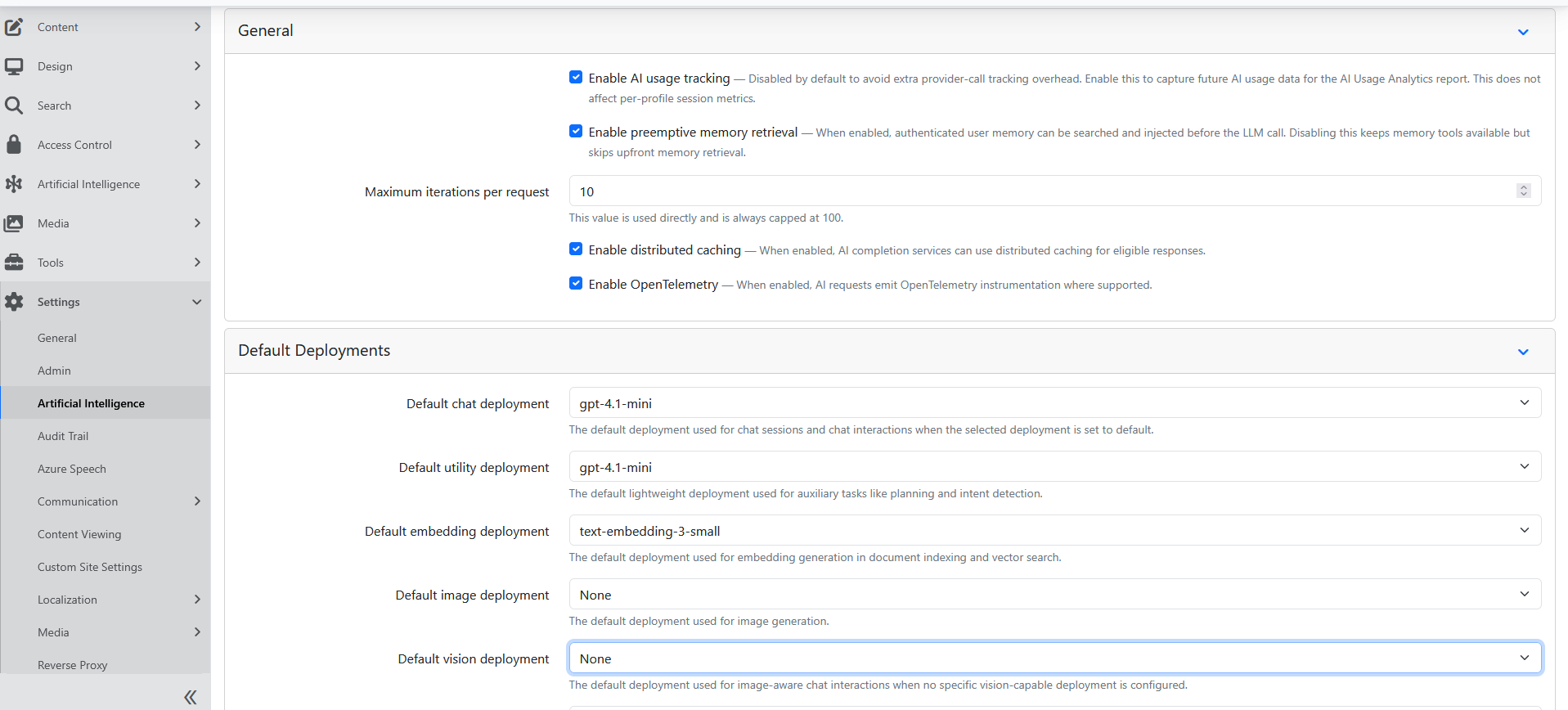
This is the foundation for the rest of the module:
- Chat deployment handles the main assistant reply.
- Utility deployment supports lighter-weight supporting work such as title generation and orchestration tasks.
- Embedding deployment supports knowledge retrieval and grounded responses.
The same tab also holds defaults for image, vision, speech-to-text, and text-to-speech deployments. A profile or chat interaction that picks its own chat or utility deployment overrides the default; one left on Default follows it. See AI Deployments for how connections and deployments are set up, what each Model capabilities checkbox does, and the order WinnerWare uses to choose a deployment. In particular, a chat deployment needs Tool calling checked, or the assistant cannot use anything on its Capabilities tab.
Use Chat Interactions for all-in-one conversations
Chat Interactions is its own style of AI experience. It is useful when a team wants one place to manage the conversation setup directly inside the chat experience instead of building a profile-led assistant first.
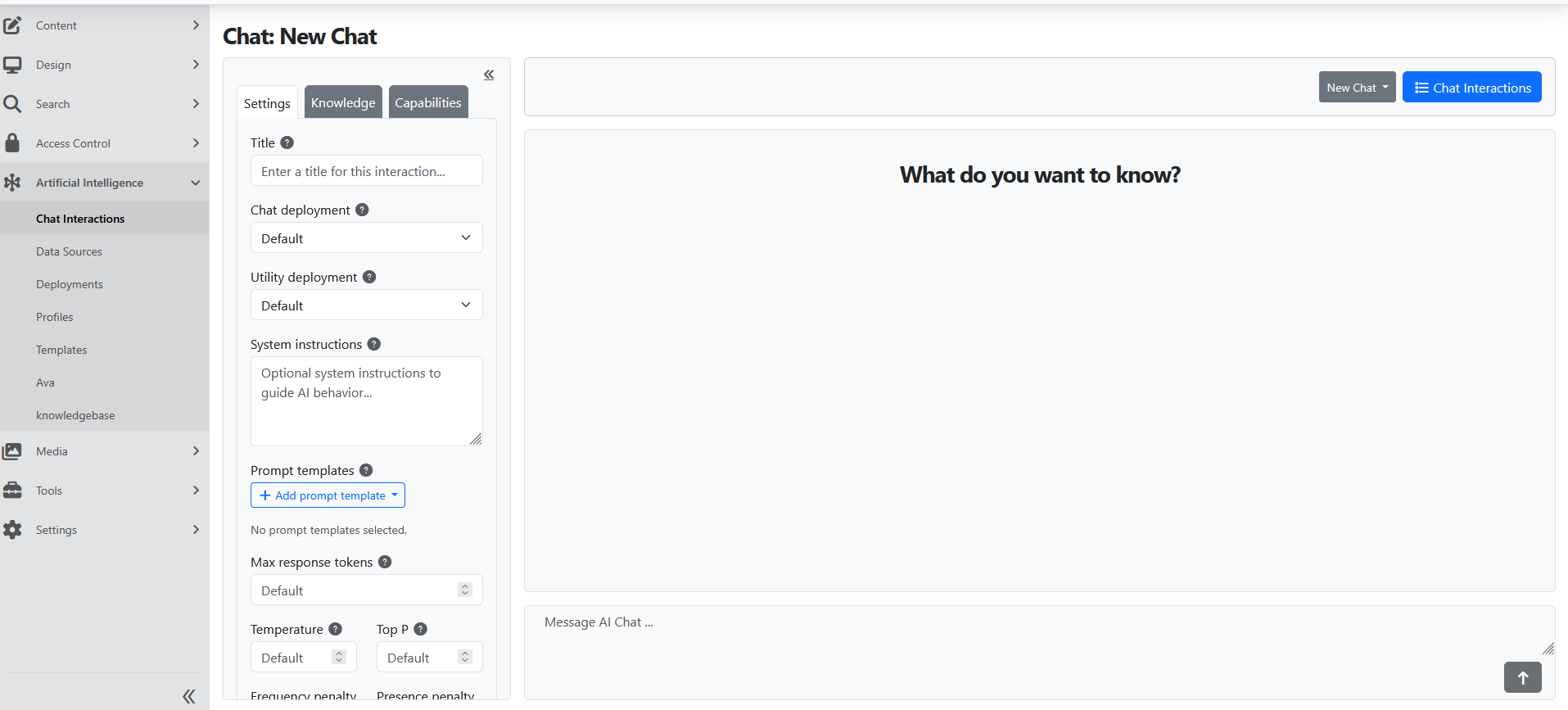
Teams can use Chat Interactions when they want to manage:
- the selected chat and utility deployments
- system instructions
- reusable prompt selections
- the Knowledge tab for document or data-source-backed context
- the Capabilities tab for additional tools and options — see AI Capabilities for what each one does and how to turn it on
Use AI Profiles for reusable assistants
An AI Profile is the better fit when teams want a defined assistant that should appear the same way every time people open it in WinnerWare.
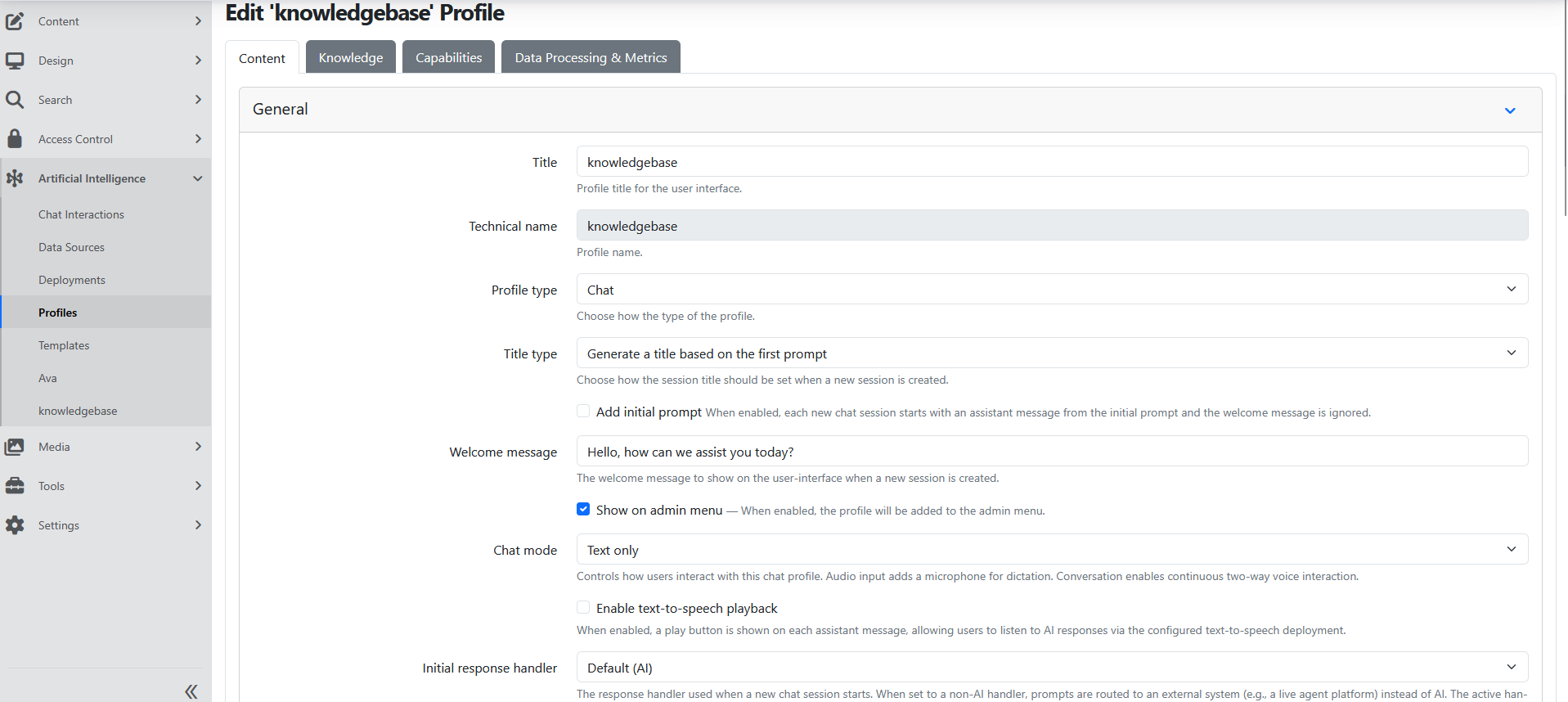
One practical WinnerWare setup uses a knowledge assistant profile with:
- Profile type set to Chat
- Title type set to generated titles
- a Welcome message
- Show on admin menu enabled
- Text only chat mode
In practice, this is the pattern used when teams want a homepage search-and-chat experience tied to approved knowledge content.
Attach a knowledge source to keep answers grounded
The profile’s Knowledge tab connects the assistant to the indexed knowledge source it should use when answering.
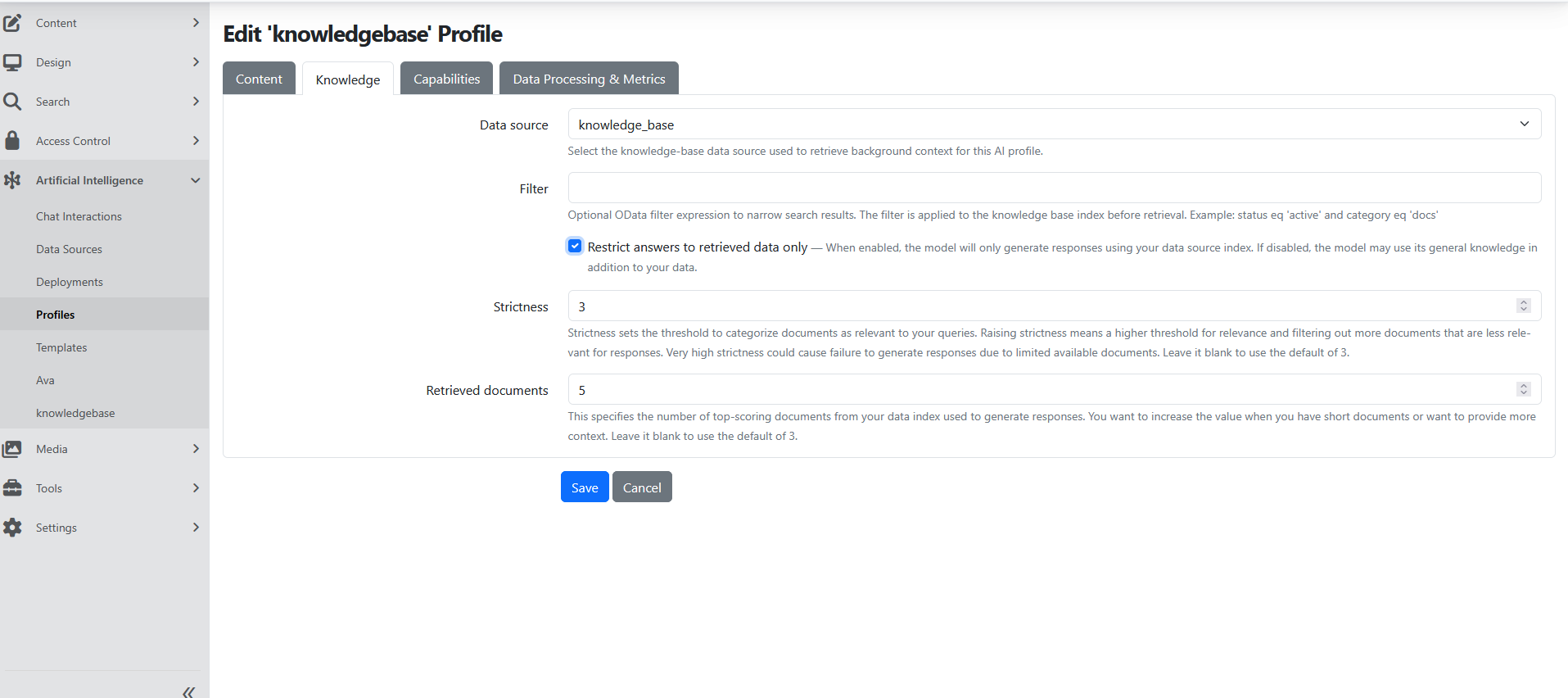
In the current WinnerWare setup, the profile is configured to use:
- Data source:
knowledge_base - Restrict answers to retrieved data only: enabled
- Strictness:
3 - Retrieved documents:
5
This is what turns a general model into a reusable assistant that answers from the WinnerWare knowledge library instead of guessing.
Connect the assistant to the approved knowledge source
The knowledge connection is managed under Artificial Intelligence -> Data Sources and links the searchable content to the assistant.
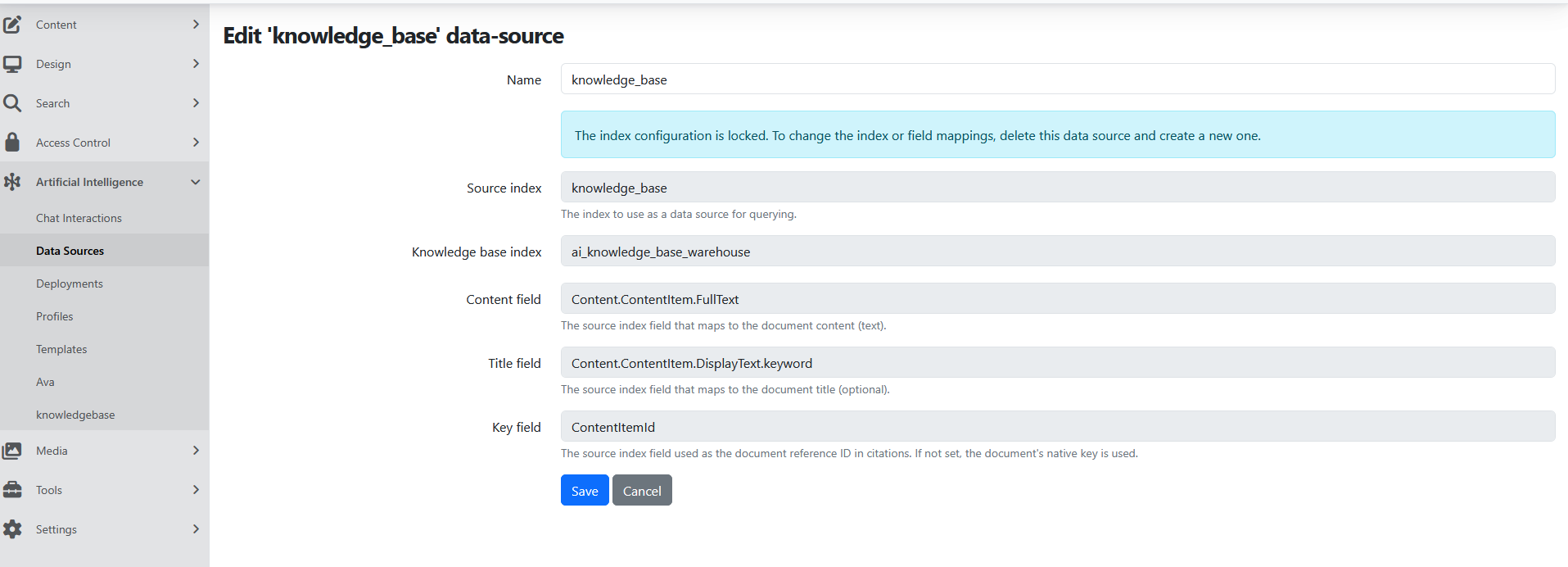
One practical WinnerWare setup uses a knowledge data source with:
- Source index:
knowledge_base - Knowledge base index:
ai_knowledge_base_warehouse - Content field:
Content.ContentItem.FullText - Title field:
Content.ContentItem.DisplayText.keyword - Key field for the source content reference
Configuration
Profiles, templates, and deployments
The easiest way to explain the WinnerWare setup is:
- Deployments choose which model should be used.
- Chat Interactions give teams an all-in-one managed chat experience.
- Profiles create reusable assistants with a defined purpose.
- Templates keep prompts and profile setup consistent.
- Knowledge sources give the assistant approved business context.
That structure is especially important when a business manager needs a stable assistant, while an implementation team still needs enough control to tune the setup.
WinnerWare setup example
One practical setup follows this flow:
- Creates the knowledge data source.
- Creates the reusable AI Profile.
- Places an AI Chat Search Form widget on the Home Page.
Page widget setup
WinnerWare includes an AI Chat Search Form widget that can be placed on a page through the flow editor.
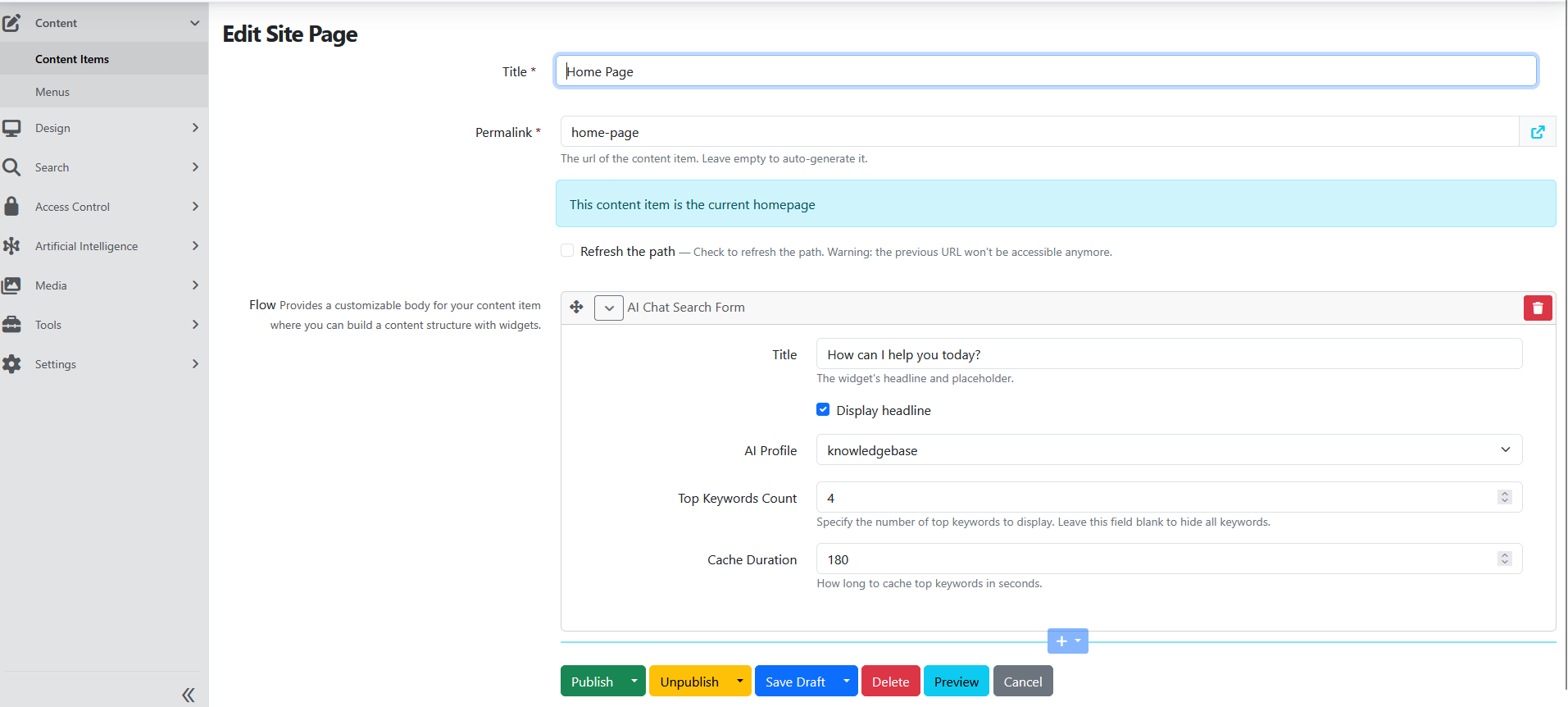
In that setup, the widget is configured with:
- Title:
How can I help you today? - Display headline: enabled
- AI Profile: the approved knowledge assistant
- Top Keywords Count:
4 - Cache Duration:
180
This is a good pattern when you want a simple search-and-chat entry point on a landing page without sending users through the full admin chat experience first.
Homepage and discovery flow
The search form works best when it sits alongside the wider knowledge experience. A strong WinnerWare pattern is to pair the chat entry point with a discovery page that helps users browse before or alongside chat.
The standard Discover page combines three practical elements:
- a Search Form
- a List of Featured Taxonomy Terms
- a Top Searched Content Items widget
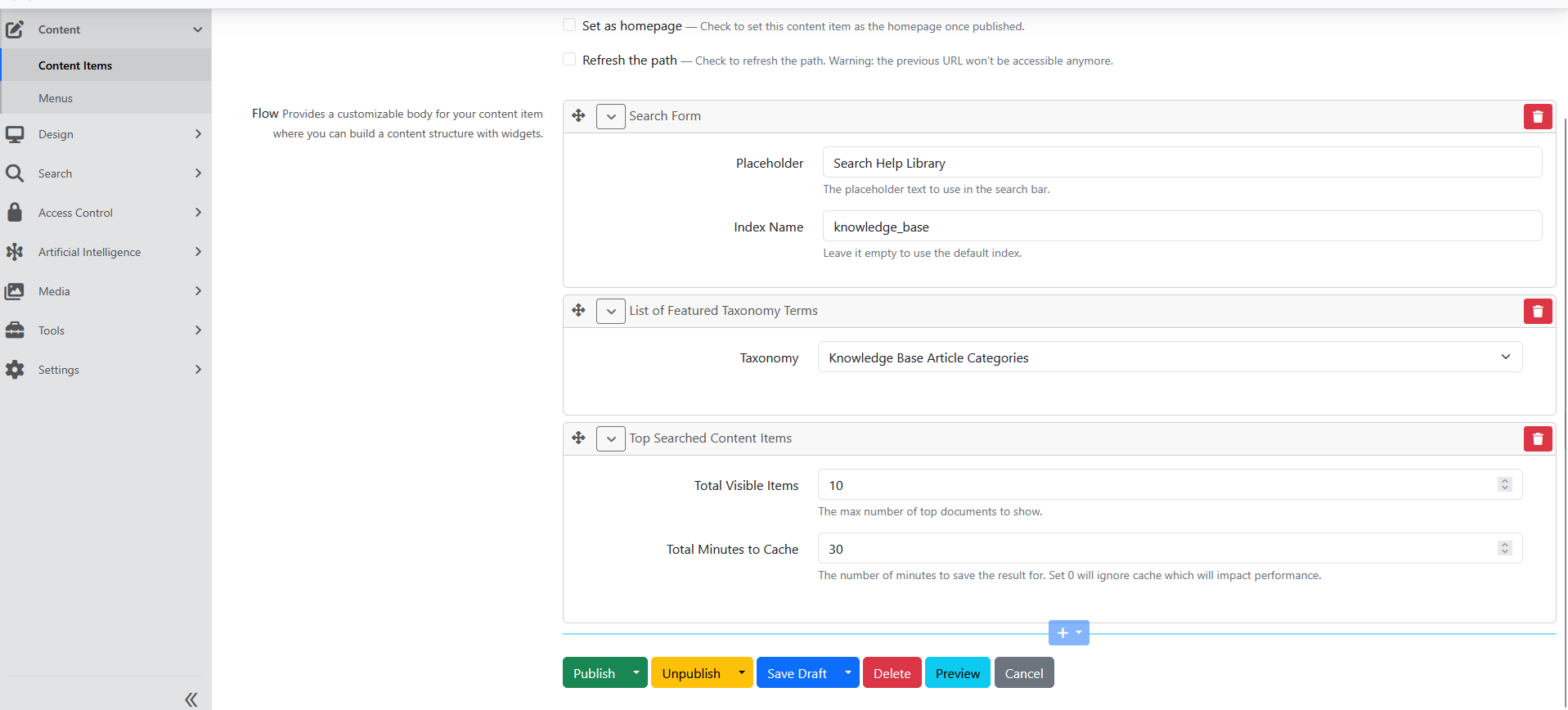
This helps users either search directly, browse by category, or start from what other users search most often, while still keeping the AI assistant close to the same knowledge experience.
Usage
Choose the right experience
Use Chat Interactions when the goal is a flexible, all-in-one chat experience where the conversation settings, knowledge options, and capabilities are managed directly in that experience.
Use an AI Profile when the goal is a reusable assistant with a defined purpose, stable behavior, and a consistent place in WinnerWare such as a homepage, menu, or shared assistant experience.
Publish a knowledge-backed assistant
A common WinnerWare pattern is:
- set the default AI options in Settings -> Artificial Intelligence
- connect the assistant to the approved knowledge source
- create the reusable AI Profile
- place the AI Chat Search Form on the homepage or another landing page
- add the assistant to the admin menu when teams need direct access
Extend it outside WinnerWare
If the same assistant needs to appear outside WinnerWare, use the External Widgets option and manage the widget catalog from the external widget admin screens.
How the embedded widget behaves
The widget's Configuration Instructions screen holds the full data-settings reference. The points that decide how it feels on a real site are:
- It sizes itself. Below the breakpoint (576px by default) the chat covers the screen, the way a phone app does. At or above it, the chat floats in the corner at the size the customer asked for, and it never grows past the browser window. Size and position values in
frameContainerapply from the breakpoint up only, because a fixed 500px panel does not fit a phone. AmobileStyleblock beside anystyleblock styles that element on small screens, andlayout.mobileFullScreen: falseturns the behaviour off for a customer who wants their own size at every width. - It opens with the customer's branding, not with ours.
branding,widgetHeaderandsessionPlaceholdertravel to the chat frame in the frame address, and the frame applies them from a script in its own<head>before anything paints. The values in the address stay in the browser: a fragment is never sent with the request, so nothing reaches a server log or a shared cache. The widget used to post these after the frame'sloadevent, which showed the packaged header first and then replaced it. - The chat page loads on the first open. A host page that nobody chats on does not pay for the chat page, its SignalR client or its styles.
- Customer styles still win. They become
!importantCSS rules. A few properties belong to the widget itself and are ignored with a console warning: onframeContainer, the ones that drive the open and close animation; onloadingIndicator,displayand the placement properties. The loading indicator is an opaque layer over the whole chat — hiding the frame while it loads is its job — and it centres its content by itself, so placement values would only shrink it until the loading frame showed through.
Talk to the assistant as well as typing
In the Conversation chat mode, people can type and talk in the same chat. A soundwave button sits next to the message box: press it to start a spoken conversation, press End Conversation to stop, and continue to type. Typed and spoken turns go into the same thread. This works the same in the front-end chat and in external chat widgets.
The conversation mode is a property of the assistant, not of the page it appears on. Turn it on once, on the profile, and every place that profile is published picks it up:
- Open the AI Profile, go to its chat mode settings, and set the chat mode to Conversation.
- Optionally pick a Conversation deployment, the model that speaks. Leave it empty to use the site's default realtime deployment. The Chat deployment stays the text model that answers typed messages.
- Optionally pick the assistant voice. Leaving it unset uses the default voice of the model that speaks.
How the conversation is spoken is resolved, not stored. WinnerWare uses the first of these that is available:
- the Conversation deployment on the profile;
- the site's default realtime deployment. The Default Deployments tab has no field for it, so it is set only when your hosting team sets it outside the admin;
- the first deployment whose Model capabilities card declares Realtime.
A realtime (speech-to-speech) deployment answers while the person still speaks, and the person can interrupt it. If no realtime deployment is available, the conversation uses speech-to-text followed by text-to-speech, which needs a default deployment for each. If those are not available either, the chat falls back to voice input, and then to text only, so the assistant always has a way to talk to it. If the Conversation deployment named on the profile cannot hold a realtime session, WinnerWare does not use a different realtime model in its place.
What people see:
- Between voice sessions, the message box and Send are in their usual place, with the soundwave button to their right.
- While a voice session is live, the message box and Send are hidden, End Conversation takes their space, and a line below tells people to use headphones. When the session ends, the message box comes back. If a person sends a typed message, the live voice session ends first, so the two never overlap.
- With a realtime deployment, a gear button next to End Conversation opens per-person audio settings — microphone, speaker, assistant volume, language, interruptions, and push-to-talk. Those settings are stored in the listener's own browser, so each person tunes their own hardware without affecting anyone else. The dictation microphone is hidden, because the realtime session already uses the microphone.
- Spoken turns are saved to the session transcript like typed ones, so history, knowledge grounding, and capabilities all keep working.
A profile that was set up before this change, with a speech-to-speech model as its Chat deployment, still speaks. When the profile editor opens it, that model shows as the Conversation deployment and the chat mode as Conversation. Saving the profile keeps that shape. Pick a text model as its Chat deployment so typed messages get an answer.
Pictures in answers
A picture in an answer shows at a limited size, so a set of pictures does not push the conversation off the screen. Click a picture to see it at full size, and click again or scroll to close it. The download button is on the lower corner of the picture: it shows when the pointer is on the picture, and it always shows on a touch screen.
Embedding a realtime widget on another site
An external widget runs inside a frame on the host page, and a frame can never be granted more than the page around it allows. Two things have to line up, and WinnerWare handles both by default:
- The embed script gives the frame
allow="microphone; autoplay; speaker-selection". Override it with theframe.allowvalue in the script'sdata-settingsonly if you know you need something different — droppingmicrophonedisables spoken chat. - WinnerWare permits those same features in the tenant's own permissions policy whenever external widgets exist. If your site emits its own stricter policy, it has to permit them too, or the browser refuses the microphone without ever prompting the person.
Also register the host domain on the widget so the frame is allowed to load there at all, exactly as you would for a text widget.
Operational Notes
- Chat Interactions and AI Profiles are different production use cases, not a draft-and-final workflow.
- The page widget pattern works well when you want a search-and-chat entry point on a landing page tied to the knowledge experience.
- The external widget option works best when the same approved assistant needs to appear beyond the main WinnerWare experience.
- Realtime voice needs a working microphone and speakers on the listener's device, and a browser prompt they accept. Plan for people who decline the prompt or work in a shared space — they can still type in the same chat.